CMDBsyncer
CMDBsyncer is a rule-based, modular synchronization hub for host and configuration data. It connects your source systems — CMDBs, asset management tools, APIs, CSV files — with your target systems like Checkmk, Netbox, or I-Doit, and keeps them in sync automatically.
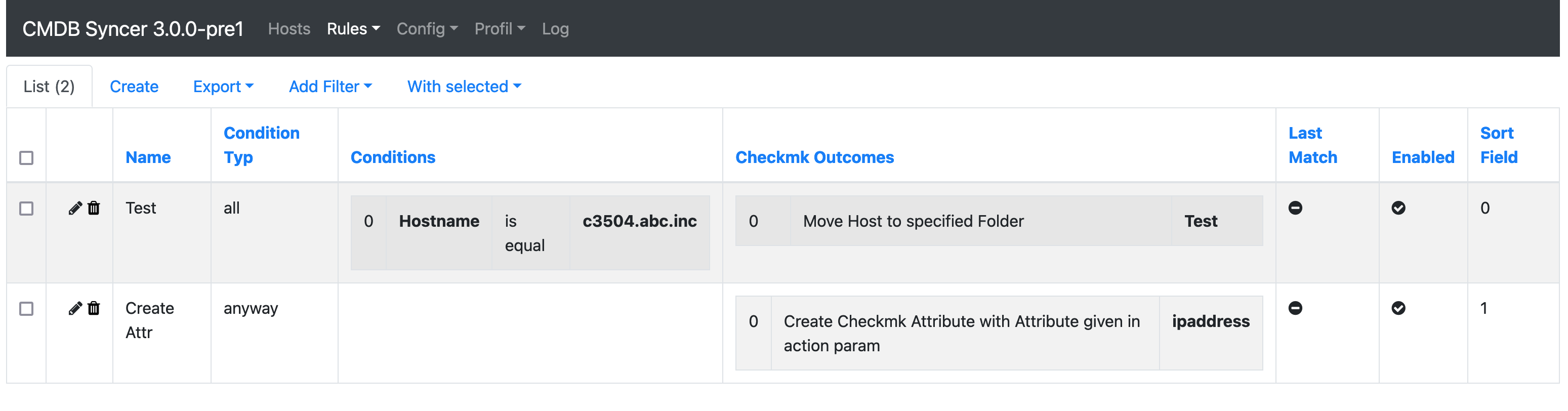
Every connection to an external system is configured through an Account. Rules control what gets synchronized, how attributes are transformed, and which hosts are included.
Key Features
- Web Interface with login, 2FA, and user management — all configuration after installation is done in the UI
- Rule Engine to control synchronization based on host attributes, with rewrite, filter, and condition support
- Jinja support throughout rules and configuration fields
- Built-in CMDB mode for managing objects, hosts, and templates directly in CMDBsyncer
- Plugin API to integrate custom data sources with minimal code
- Cron management to schedule sync jobs from the UI, including externally-triggered runs via per-group webhook tokens
- Notifications with email out of the box and rule-based routing
- REST API for external automation
- Ansible support — dynamic inventory source plus a built-in UI runner, run history, and event-driven onboarding rules
- Encryption of stored credentials
- Debug tooling via CLI and web-based debug views
- Monitoring integration via Checkmk Exchange check
What's New in 4.0
Version 4.0 is a major release. Highlights — see the changelog for the full list:
- Admin UI refresh across every page — consistent card layout for edit forms, sticky table headers, modernised login and start page, plugin-picker for new accounts
- Notifications — Settings → Notifications with Channels and Rules, email out of the box
- Cron groups: external webhook trigger with per-group token; resilient mode that continues remaining tasks on failure; auto-released locks; per-group "last successful run" tracking
- Ansible Workspace — Ansible Projects as their own inventory providers, a Run Playbook page with
--check --diffpreview, event-driven Fire Rules, a playbook catalog and acmdbsyncer ansible …CLI
How it Works
CMDBsyncer imports hosts and attributes from one or more sources, processes them through the rules engine, and exports the result to the configured targets. Sources and targets can overlap — a system like Checkmk or Netbox can be both.
Supported Integrations
Full-Featured Modules
| Module | Import | Export | Notes |
|---|---|---|---|
| Checkmk | ✓ | ✓ | Full host lifecycle, rules, tags, labels, groups, BI, DCD, agents, sites — tested with 140,000+ hosts |
| Netbox | ✓ | ✓ | Devices, VMs, interfaces, IPAM, contacts, sites |
| I-Doit | ✓ | ✓ | Template-based device sync |
| Ansible | — | ✓ | Dynamic inventory source, Checkmk agent and site management, UI playbook runner with run history and rule-driven firing |
| CMDB Mode | ✓ | ✓ | Use CMDBsyncer itself as a lightweight CMDB |
Import Sources
| Module | Description |
|---|---|
| REST API / JSON | Import from any REST API or JSON file structure |
| CSV | Import hosts or enrich attributes from CSV files |
| LDAP | Import objects from LDAP directories |
| JDisc | Import devices from JDisc Discovery |
| ServiceNow | Import hosts from the ServiceNow Table API (CMDB CIs) |
| Jira | Import objects from Jira (on-prem and cloud) |
| Cisco DNA | Import devices and interface information |
| BMC Remedy | Limited import from BMC Remedy |
| PRTG | Import objects from PRTG |
| VMware | Import and export attributes for VMware VMs |
| MySQL | Import and inventorize MySQL database tables |
| MSSQL / ODBC | Import from any ODBC-compatible database (FreeTDS, MSSQL, etc.) |
Getting Started
- Install CMDBsyncer: Docker or Apache/WSGI
- Understand how it works
- Create your first Account
- Set up an Import
- Configure Rules
- Export to a target system
Trademarks
Checkmk, Netbox, Ansible, I-Doit, Jira, ServiceNow, VMware, PRTG, JDisc, Cisco DNA, BMC Remedy and all other product names used in this documentation are trademarks or registered trademarks of their respective owners. They are named solely to describe which systems CMDBsyncer can exchange data with.
CMDBsyncer is an independent project and is not affiliated with, endorsed by, or sponsored by any of these vendors. No vendor logo ships with the software — the module icons shown in the "Modules" menu are neutral in-house marks.